Every Naira.
Perfectly Tracked.
Xpens is the complete financial platform for Nigerian businesses. Send invoices on WhatsApp. Run payroll in 4 minutes. Auto-sync your bank. Manage taxes. All in one place.
Free forever · No credit card · Cancel anytime
4 min
Average payroll time
60 sec
Invoice creation time
20+
Nigerian banks connected
₦0 fee
Setup cost
Your clients live on WhatsApp.
Your invoices should too.
Create a professional invoice in 60 seconds. Send it directly to your client's WhatsApp. They click one link. Pay with their card or bank transfer via Paystack. You get notified instantly.
No email chains. No PDF attachments. No chasing. No waiting.
- Invoice created in 60 seconds
- Sent to client WhatsApp instantly
- Client pays via Paystack (card or transfer)
- Payment confirmed immediately
- Auto-reminder if unpaid (day 3, 7, 14)
Xpens
online
Invoice INV-2026-084
Hello Chidi — here is your invoice from Adebayo Trading.
₦860,000.00
Due 15 Mar 2026
12:04 ✓✓
✅ Payment received
₦860,000 from Chidi Okonkwo
2 minutes ago
Everything your business needs.
Six modules. One platform. No switching between tools.
Auto Expense Tracking
Every naira tracked automatically. AI categorises expenses the moment your bank transaction clears. Zero manual entry.
WhatsApp Invoicing
Send professional invoices directly to client WhatsApp. Paystack payment link included. Get paid in minutes not weeks.
Nigerian Payroll
Run payroll for your entire team in 4 minutes. PAYE calculated exactly per FIRS 2024 rates. Payslips sent via WhatsApp automatically.
Tax Compliance
VAT returns and PAYE schedules generated automatically. Tax calendar with FIRS deadline reminders. Zero penalties.
Real-Time Bank Sync
Connect GTBank, Access, Zenith, UBA and 20+ Nigerian banks. Transactions appear in Xpens the moment they hit your account.
AI Financial Advisor
Ask your finances anything. Get instant answers about spending, cash flow, and growth opportunities based on your real data.
See Xpens in action
Watch how Nigerian business owners manage their finances — play a walkthrough on this page. No WhatsApp required.
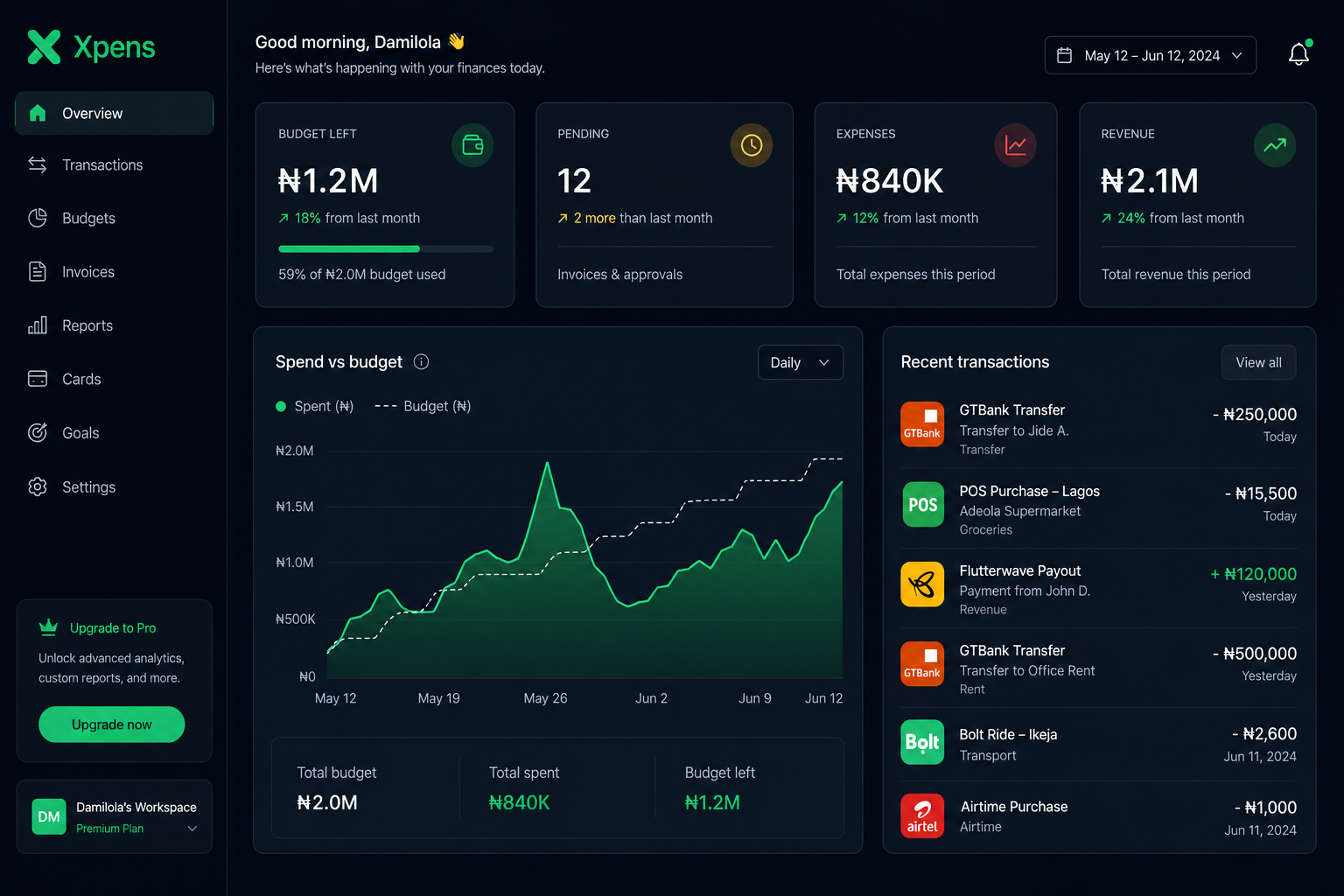 0:45
0:45Your command centre — budgets, spend, and cash in one view
Prefer a live walkthrough?
Book a live demo on WhatsAppWe reply within 2 hours · No commitment · 15 minutes only
Up and running in 3 minutes.
No accountant needed. No training required. If you can use WhatsApp, you can use Xpens.
Create your workspace
Sign up free. Enter your business name and choose NGN. Takes 90 seconds.
Connect your bank
Link your Nigerian bank account. All transactions sync automatically from this moment.
GTBank ·····4821
Connected
Watch your finances work
Expenses appear automatically. Send your first invoice. Run payroll. Your financial life just got easier.
Revenue
₦2.1M
Burn
₦840K
Trusted by Nigerian businesses
Verified Xpens userI used to spend every Sunday reconciling receipts and running payroll manually. With Xpens I do it in under 4 minutes on Friday afternoon. I genuinely got my weekends back. That alone is worth the subscription.
Verified Xpens userMy clients used to take 2 to 3 weeks to pay. I send them a WhatsApp invoice now and most pay the same day. One client said the payment link was so easy he paid immediately from his phone. Cash flow completely changed.
Verified Xpens userFor 3 years I had no idea what my actual profit margin was. My accountant would tell me at year end. Xpens shows me in real-time. I made a pricing decision last month based on that data and saved ₦180,000.
Real customers. Real businesses. Want to share your Xpens story? Email us at admin@xpens.com.ng — we feature a new customer every month.
These are real Xpens users. We are building our verified customer wall — join as an early customer and be featured here.
Become a featured customer →Simple pricing. No surprises.
Start free. Upgrade when you need more. Cancel anytime. No contracts.
Free
₦0per month, forever
Perfect for individuals and solo business owners getting started.
- 50 expenses tracked automatically
- Send professional WhatsApp invoices
- Live financial dashboard
- Perfect for solo founders
- 3 budget categories tracked
- 🔒 Unlock with Pro — WhatsApp invoicing
- 🔒 Unlock with Pro — Bank sync
- 🔒 Unlock with Pro — Payroll
- 🔒 Unlock with Pro — Tax returns
- 🔒 Unlock with Pro — AI insights
Pro
₦10,000per month
≈ $6/month · Paystack billing
For serious businesses that want complete financial control.
- Unlimited expenses
- WhatsApp invoicing + Paystack payments
- Real-time bank sync (20+ Nigerian banks)
- Full payroll + PAYE (unlimited staff)
- VAT & PAYE tax returns
- AI financial advisor
- Receipt scanning
- Unlimited team members
- Unlimited budgets
- CSV exports & reports
- API access
- Priority support
No credit card required for trial
Here is what changes when you go Pro
Your bank talks to Xpens
Every transaction appears automatically. You stop entering data and start reading insights.
Payroll done before your tea gets cold
Click run payroll. PAYE calculated. Payslips sent to every employee via WhatsApp. 4 minutes total.
Never miss a FIRS deadline again
VAT returns and PAYE schedules generated automatically. Tax calendar with reminders.
Ask your money anything
Type “Where did I overspend this month?” and get a real answer in 3 seconds.
The average business loses ₦300,000+/month to poor financial management. Xpens costs ₦10,000/month. The math is simple.
Questions? Answered.
Everything you need to know before you start.
Not at all. If you can send a WhatsApp message, you can use Xpens. We built it for business owners, not accountants. Everything is explained in plain English — no financial jargon.
Create your invoice in Xpens (60 seconds). Click 'Send via WhatsApp'. Your client receives a professional message with a payment link. They click, pay with their card or bank transfer via Paystack, and you are notified immediately.
We support GTBank, Access Bank, Zenith Bank, UBA, First Bank, FCMB, Stanbic IBTC, Fidelity, Union Bank, Sterling, Polaris, Wema, Jaiz and more through our Mono integration.
Yes. Bank-grade SSL encryption on all data. Your bank credentials are never stored on our servers — bank connections are handled by Mono, who are CBN-approved. We are NDPR compliant.
100% accurate to FIRS 2024 specification. We calculate using the exact graduated tax bands (7% to 24%), pension (8% employee, 10% employer), NHF, and consolidated relief allowance. Reviewed by Nigerian tax professionals.
Yes. 14-day free trial on Pro. No credit card required. Full access to every feature. Downgrade to Free or subscribe at the end.
Your data is yours. Export everything as CSV before you leave. We retain your data for 90 days after cancellation in case you return.
Email admin@xpens.com.ng or WhatsApp us directly. We are a Nigerian team in the same timezone. We respond within hours, not days.
Stop guessing.
Start knowing.
Join thousands of Nigerian businesses who manage their finances on Xpens. Free forever. Upgrade when ready.
Opens WhatsApp · We reply within 2 hours
- 🔒 Bank-grade security
- 🇳🇬 Built for Nigeria
- ⚡ Setup in 3 minutes
- 💳 No card required
- 📱 Works on any device